Follow these steps to change the password of your Cisco 3848V modem.
- Visit the Admin Console by visiting 192.168.0.1 in your Internet browser.
- To Log in just click login there is no username or password
- Click Login.
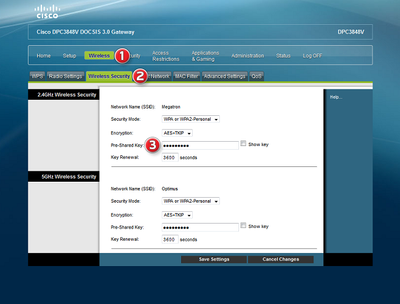
- Click Wireless at the top of the page.
- Click the Wireless Security tab.
- Under 2.4GHz Wireless Security, type a new password for the network in the Pre-Shared Key field.
- Under 5GHz Wireless Security, type a new password for the network in the Pre-Shared Key field.
- Click Save Settings before closing the window.